
Amazon Savings Guide
Amazon Subscribe & Save: How It Works and How to Save the Most
Last researched and checked: August 4, 2026
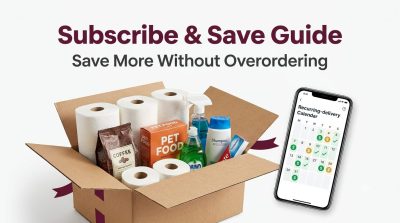
Amazon Subscribe & Save can lower the cost of products you buy repeatedly, but the program is easy to misunderstand. The discount is not always 15%, the price is not locked forever, coupons may apply only to the first delivery, and an automatic shipment can become expensive if you do not review it before the order processes.
This guide explains how Amazon Subscribe & Save works, how the discount tiers are calculated, how to reach the highest standard discount, how to skip or cancel a delivery, what happens when prices change, and how to decide whether a subscription is genuinely cheaper than buying normally.
[ddhq_button retailer=”amazon” destination=”https://www.amazon.com/Subscribe-Save/b?ie=UTF8&node=5856181011″ text=”Browse Amazon Subscribe & Save”]
What Is Amazon Subscribe & Save?
Subscribe & Save is Amazon’s recurring-delivery program for eligible household products. Instead of placing a new order each time you run low, you choose a quantity and delivery frequency. Amazon schedules future deliveries until you skip, change, or cancel the subscription.
Common eligible categories include groceries, beverages, pet supplies, vitamins, personal care, beauty products, cleaning supplies, paper goods, office supplies, automotive consumables, baby products, and other items people replace regularly. Not every product or seller participates, and eligibility can change.
Is Subscribe & Save free?
There is no separate Subscribe & Save membership fee. You pay for each shipment when it is processed. Amazon advertises free standard shipping on automatic deliveries, although non-Prime customers may encounter shipping charges on an initial delivery in some circumstances. Always check the order summary shown to your account.
Do you need Amazon Prime?
No separate Prime membership is generally required to create a Subscribe & Save subscription. Prime can still affect shipping speed or other Amazon benefits, so the checkout display may differ between Prime and non-Prime accounts.
How Amazon Subscribe & Save Discounts Work
The discount is product-specific. A seller can fund a base Subscribe & Save discount of 0%, 5%, or 10%. When you receive five or more qualifying subscription items in one delivery to one address, Amazon may add an additional 5% discount.
| Seller-funded base discount | Four or fewer qualifying subscriptions | Five or more qualifying subscriptions |
|---|---|---|
| 0% | 0% | 5% |
| 5% | 5% | 10% |
| 10% | 10% | 15% |
This is why one item may show “Save 5%” while another offers 10%, and why the same item may display a higher discount after you schedule enough subscriptions for the same delivery. The product page and your upcoming-delivery screen are the final authority for your account.
Can the discount be more than 15%?
Yes, in limited situations. Amazon may display first-subscription coupons, seller promotions, targeted offers, or special baby-product savings that exceed the normal 15% standard tier. These offers are product-, account-, and time-specific. A large coupon often applies only to the first delivery.
Does 15% apply to every item?
No. “Up to 15%” is not a universal promise. If the seller funds 0%, a five-item delivery may receive only 5%. If the seller funds 5%, it may receive 10%. Only products with a 10% seller-funded base ordinarily reach 15% through the additional five-item discount.
How to Get the Maximum Discount
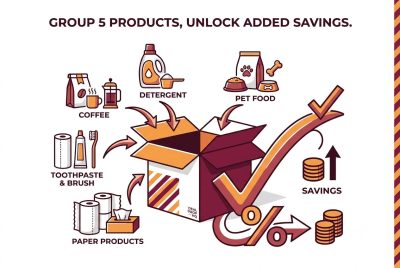
- Start with products you already buy. Good candidates include toothpaste, coffee, pet food, trash bags, detergent, vitamins, and paper products.
- Check the advertised base discount. Look for the Subscribe & Save percentage beside the subscription option.
- Schedule qualifying subscriptions for the same delivery day. The extra discount depends on the products arriving together at one address.
- Use inexpensive necessities to reach five only when genuinely needed. Unnecessary filler destroys the savings.
- Clip eligible coupons before subscribing. Confirm whether the coupon applies only to the first delivery.
- Review the upcoming order before the cutoff. Skip or cancel anything overpriced or unnecessary.
- Compare the final unit price. A larger package or competing brand may still be cheaper.
Should you add cheap filler subscriptions?
Only when they are things you would buy anyway. Compare the extra savings unlocked on the entire delivery with the true cost of the added products. A $3 item that unlocks $8 of additional savings can make sense when you will use it. Five random items that add $20 to the order do not save money merely because the percentage is higher.
Does Subscribe & Save Lock in the Price?
No. The price for future deliveries can increase or decrease. Amazon’s terms allow the price, discount, taxes, availability, and other order details to change between shipments. Amazon generally sends a reminder before an upcoming shipment so you can review it.
You are charged the price associated with the upcoming subscription order when it is processed, not necessarily the price from the day you originally subscribed. The percentage discount can stay the same while the underlying product price rises enough to make the delivery a poor deal.
How to protect yourself from price increases
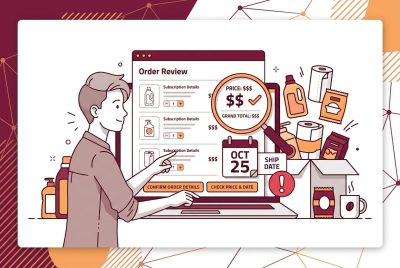
- Read the reminder email before shipment.
- Open Your Subscribe & Save Items and review every product.
- Compare the subscription price with the current one-time price.
- Compare unit prices with other sizes, brands, local stores, and warehouse clubs.
- Skip or cancel any product whose price climbed too high.
- Do not assume a first-delivery coupon will repeat.
- Watch for package-size or quantity changes.
Can you get a price adjustment if the price drops?
Do not count on a retroactive adjustment. Review the upcoming order before it enters the shipping process. If it has not processed, skipping or changing the delivery may be safer than hoping Amazon will refund a later difference.
How Subscribe & Save Coupons Work
Some eligible products display a checkbox coupon, dollar-off offer, percentage-off coupon, or “extra savings when you subscribe” promotion. Sellers can create coupons specifically for the first delivery of a new subscription, so a dramatic first-order discount may not repeat.
- Clip the coupon before subscribing. Seeing a coupon is not always enough.
- Read the terms. Look for “first Subscribe & Save order,” expiration dates, product restrictions, and account eligibility.
- Check the order summary. Confirm the coupon and subscription discount appear.
- Expect future deliveries to cost more. Once a first-delivery coupon disappears, only the regular discount may remain.
- Do not assume coupons stack. Amazon decides which promotions can combine.
Can a coupon and Subscribe & Save work together?
Sometimes. Many product pages specifically offer a coupon when Subscribe & Save is selected, and seller promotions can be layered with the subscription discount. Whether a particular coupon stacks depends on its terms and the checkout display.
Will the coupon apply to every delivery?
Usually not when the offer says “first delivery” or “first subscription order.” Assume it is one-time unless the terms clearly say otherwise.
How to Start a Subscribe & Save Order
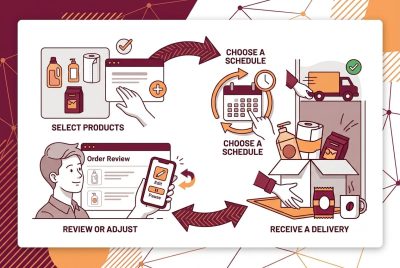
- Open an eligible Amazon product page.
- Select Subscribe & Save instead of the one-time purchase option.
- Choose the quantity.
- Select an available delivery frequency.
- Clip any eligible coupon and review the discount.
- Confirm the address and payment method.
- Review the first delivery date and total.
- Submit the subscription.
Available intervals can vary by product and account. Choose a conservative frequency at first. It is easier to move a future shipment forward than to deal with an unnecessary supply that already shipped.
[ddhq_button retailer=”amazon” destination=”https://www.amazon.com/Subscribe-Save/b?ie=UTF8&node=5856181011″ text=”Shop Subscribe & Save Items”]
How to Manage Your Subscriptions
Amazon lets you manage subscriptions from the Subscribe & Save section of Your Account. Depending on the item and processing stage, you may be able to change quantity, frequency, delivery date, payment method, address, or subscription status.
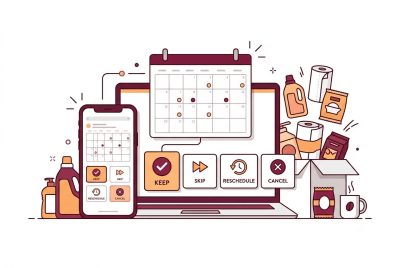
How to skip the next delivery
- Open Your Subscribe & Save Items.
- Find the product you do not need yet.
- Select Skip Next Delivery.
- Confirm before the order ships.
- Verify that the next scheduled date moved forward.
How to change the delivery frequency
- Open the Subscriptions tab.
- Select the product.
- Choose the schedule or frequency option.
- Select an available interval.
- Confirm and verify the next delivery date.
How to change the delivery day
Open the Subscribe & Save settings area, choose the delivery-day option, select a new date from the available calendar, and confirm. A late change may not affect an order already processing.
How to cancel a subscription
- Go to Your Subscribe & Save Items.
- Select the Subscriptions tab.
- Choose the product.
- Select Cancel subscription.
- Choose a reason if requested and confirm.
Canceling stops future scheduled deliveries. It may not stop an order that already entered the shipping process. Review the confirmation and your regular orders to verify what will still arrive.
Can You Cancel After the First Delivery?
Amazon’s customer terms state that you may cancel a subscription at any time or skip the next delivery before it ships. You are not normally committing to a fixed number of future deliveries. However, a shipment already processing may be too late to stop.
A first-delivery coupon is intended to encourage a new subscription. Canceling solely to repeatedly chase new-subscriber promotions may cause offers to become unavailable, and Amazon can change eligibility or terms. Use the program for products you may reasonably want again, then cancel when it no longer serves you.
Does Canceling One Item Affect the Five-Item Discount?
It can. If removing or skipping an item drops an upcoming delivery below the required number of qualifying subscriptions, the extra discount may disappear from the remaining items. Check projected savings after every schedule change.
What If an Item Is Out of Stock?
A subscription does not guarantee inventory. Amazon or the seller may delay, skip, or cancel an upcoming delivery when an item cannot be fulfilled. If that changes the number of qualifying subscriptions, your extra discount may also change. Watch emails and the dashboard.
What If the Seller, Size, or Product Changes?
Eligibility can change. An offer may become unavailable, a variation may disappear, a package size may change, or a future delivery may be canceled. Confirm that the exact brand, size, count, flavor, scent, formula, and seller still match what you intended.
How Shipping Works
Amazon advertises free standard shipping on automatic Subscribe & Save deliveries. Non-Prime shoppers may encounter shipping costs on the first delivery in some situations. Delivery timing is organized around the subscription schedule rather than necessarily using the fastest Prime speed.
Do not subscribe to an item you urgently need unless the first-delivery date shown at checkout works for you. A one-time order may arrive faster.
How Payment and Charging Work
Amazon charges each shipment when the order is processed using the payment method associated with the subscription or account. Because prices and taxes can change, the amount may differ from one delivery to the next. Keep the payment method current.
- Check the upcoming total, not only the percentage.
- Review taxes and shipping charges.
- Make sure the card has not expired.
- Confirm the delivery address.
- Do not assume rewards points or every promotional balance can be used.
Is Subscribe & Save Always Cheapest?
No. It is a discount from Amazon’s current eligible price, not a guarantee of the lowest price anywhere. A one-time Amazon sale, local promotion, warehouse-club package, store brand, different size, or competing seller may cost less.
Use this comparison formula
Compare ounces to ounces, counts to counts, loads to loads, and servings to servings.
Also consider waste. A bulk product is not cheaper if it expires, becomes stale, no longer fits your needs, or piles up faster than your household can use it.
Best Products for Subscribe & Save
- Products with stable, predictable usage
- Nonperishable household basics
- Pet supplies used consistently
- Cleaning products and paper goods
- Personal-care products with long shelf lives
- Favorite grocery staples
- Baby essentials when size and usage are predictable
- Products with strong first-delivery coupons that stay competitive afterward
Products to Be Careful Subscribing To
- Products with volatile prices
- Food that may expire
- Supplements you have not tried
- Items where your preferred flavor, size, scent, or formula may change
- Baby products the child may quickly outgrow
- Seasonal products
- Products often discounted more deeply elsewhere
- Large quantities bought only to unlock a percentage
Monthly Review Checklist
- Do I still need every item?
- Is the quantity correct?
- Is the delivery date too early or too late?
- Did the base price increase?
- Did a first-delivery coupon disappear?
- Am I still receiving the expected five-item discount?
- Is the package size unchanged?
- Is another brand or size cheaper per unit?
- Is the address correct?
- Is the payment method current?
- Will anything expire or go unused?
Amazon Subscribe & Save FAQ
Is it a contract?
No fixed-term commitment is normally required. You can cancel future deliveries or skip an upcoming delivery before it ships, subject to Amazon’s current terms and processing status.
Does it cost money to join?
There is no separate enrollment fee. You pay for each shipment.
Do you need five different items to get 15%?
You generally need five or more qualifying subscriptions scheduled in one delivery to one address to unlock the additional 5%. The final discount still depends on each product’s seller-funded base, so not every item reaches 15%.
Does ordering five of the same item count?
Do not assume quantity equals qualifying subscriptions. Follow the progress indicator in your account.
Can you change quantity?
Amazon commonly allows quantity changes from the management page, although controls can vary by item and how close the order is to processing.
Can you change frequency?
Yes. Open the subscription, choose the schedule option, and select one of the available intervals.
Can a subscription item arrive immediately?
The first delivery date is shown during signup and may differ from a normal order. Compare both options when speed matters.
Can you skip more than one delivery?
You can manage future deliveries by skipping the next shipment or changing the frequency. Confirm the new date after saving.
Will canceling stop an order that shipped?
No. Once an order enters shipping, canceling the subscription generally affects the next scheduled shipment.
Why did my discount drop?
An item may have been skipped, canceled, delayed, or removed; the seller-funded discount may have changed; or the delivery may no longer contain five qualifying subscriptions.
Why is my second delivery more expensive?
The base price may have increased, a first-delivery coupon may have expired, the discount tier may have changed, or the package size or seller may differ. The original price is not locked.
Can coupons be reused?
Many are limited to the first order of a new subscription. Read the terms and do not expect the coupon on future shipments unless Amazon says it repeats.
Can you use it without Prime?
Generally, yes. Prime is a separate program. Shipping costs or timing—especially on an initial order—may differ by account.
Are returns different?
A processed shipment becomes a regular Amazon order. Return eligibility depends on category, seller, condition, and current policy. Some grocery, personal-care, hazardous, or consumable items may be non-returnable.
Does Amazon remind you before shipping?
Amazon says it emails customers before each shipment. Keep your email current and also check the dashboard regularly.
Can an item disappear from the program?
Yes. Eligibility, inventory, sellers, variations, and program availability can change. Amazon may delay or cancel a future delivery.
Is Amazon Subscribe & Save Worth It?
It can be worthwhile when you buy the same necessities repeatedly, compare unit prices, use legitimate coupons, coordinate five useful subscriptions, and review every shipment. It becomes risky when you treat the original price as permanent or let unwanted deliveries run automatically.
The best strategy is simple: subscribe only to products you expect to use, choose a cautious schedule, audit the order before it processes, and cancel or skip whenever the numbers stop making sense.
[ddhq_button retailer=”amazon” destination=”https://www.amazon.com/Subscribe-Save/b?ie=UTF8&node=5856181011″ text=”Explore Amazon Subscribe & Save”]
Official Sources and Editorial Note
This guide was researched using Amazon’s current Subscribe & Save customer-service pages, program terms, ordering instructions, schedule-management instructions, cancellation instructions, and Amazon’s program explanation for sellers. Amazon can change prices, discounts, eligibility, interfaces, and terms. Always rely on the details displayed in your account.
- Amazon Subscribe & Save Customer Service
- Subscribe & Save Terms and Conditions
- How to Order a Subscription
- How to Skip a Delivery
- How to Cancel a Subscription
Affiliate disclosure: This article contains Amazon affiliate links. As an Amazon Associate, Deal Drop HQ earns from qualifying purchases. Using a link does not increase your price. Amazon and the Amazon logo are trademarks of Amazon.com, Inc. or its affiliates.